


A clearer control panel
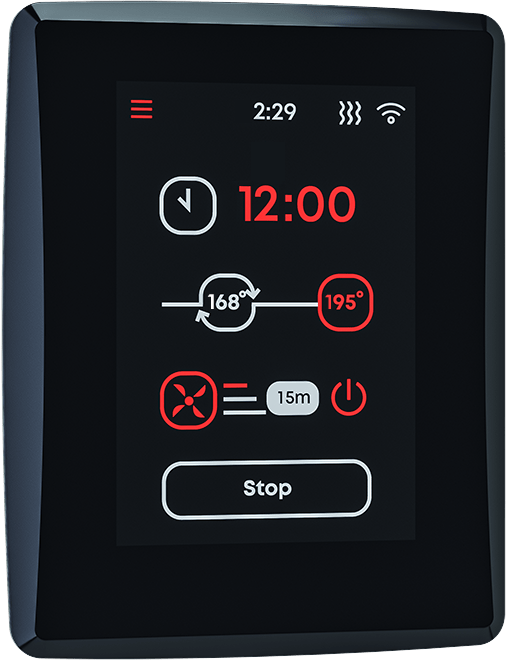
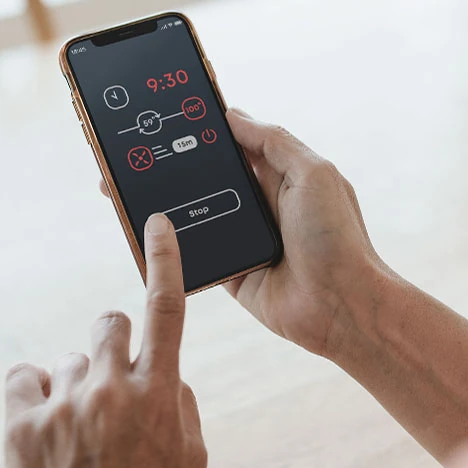
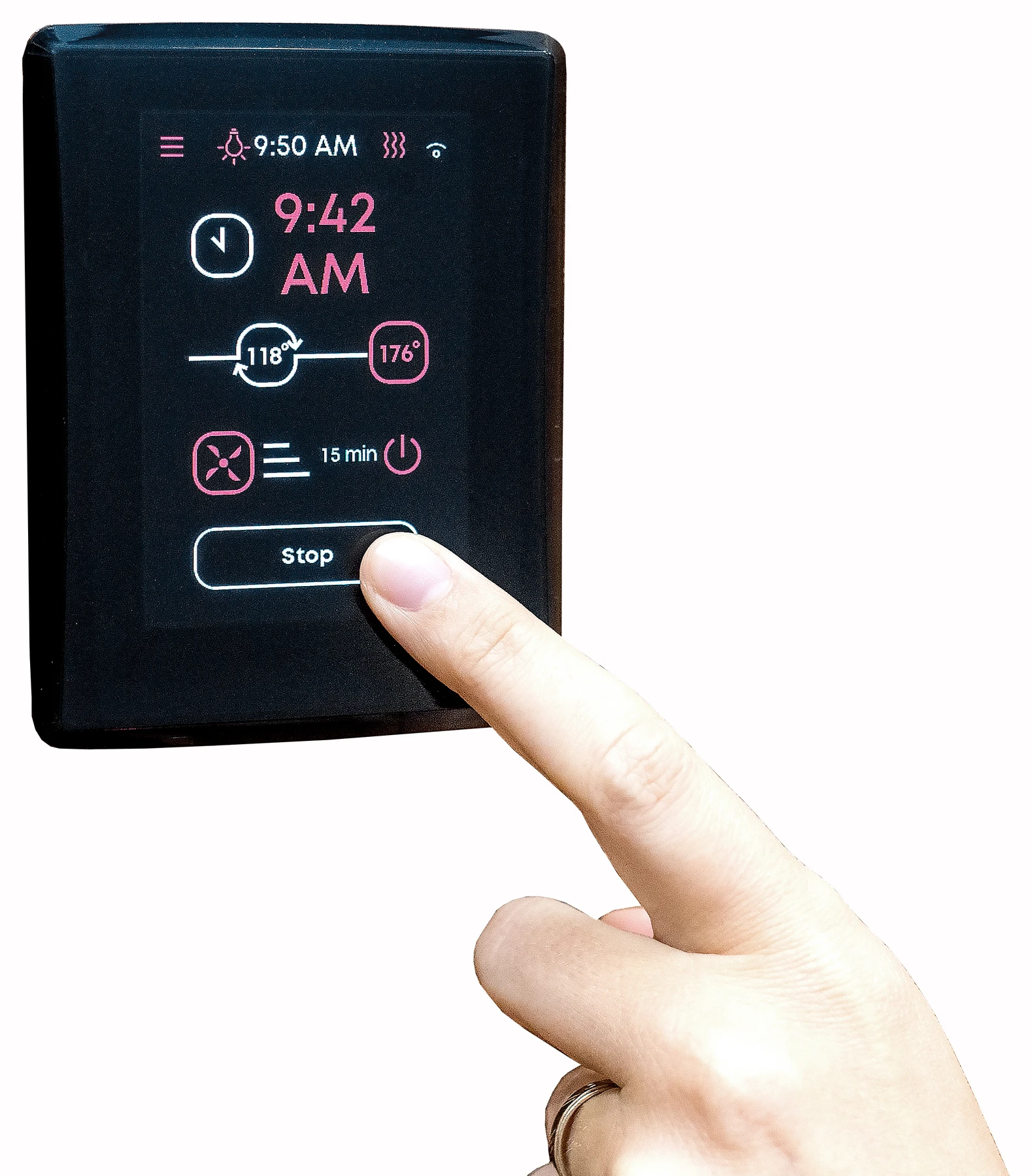
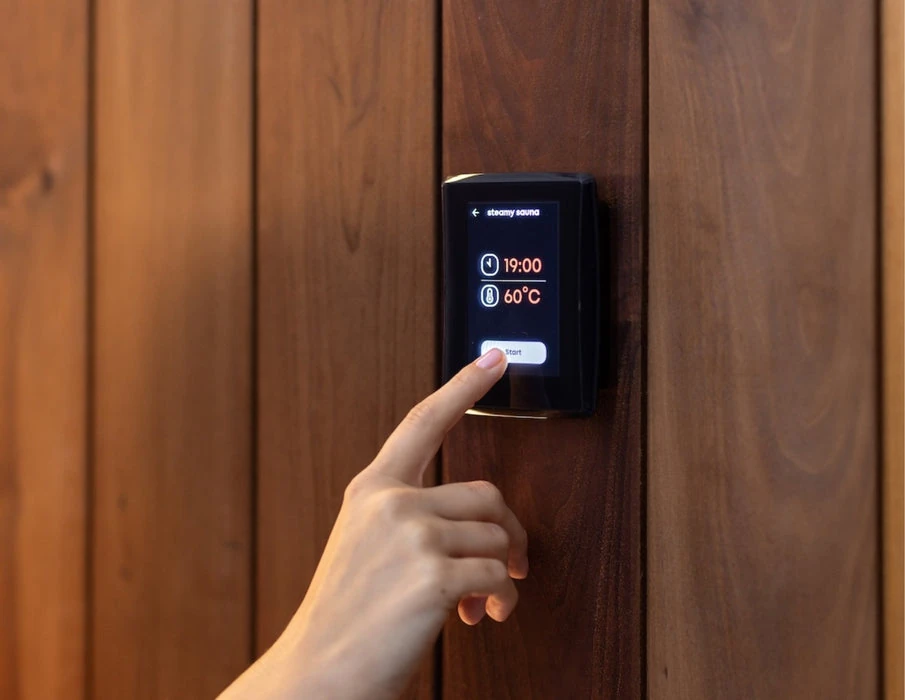
Session screens, menus, and settings have been rebuilt with larger touch areas. Red items are interactive. White items show information.
Small details become expensive problems once installation begins. We ask the questions early, so a mismatched part, an overlooked requirement or an installation issue gets caught while it is still easy to fix.
Our job does not end when your order ships. We stay available through installation and beyond. If something needs attention, we stay involved, work the problem, and help see it through.
We want you to feel good about choosing Sauna Marketplace long after your first session, and confident recommending us to a friend. That standard guides the advice we give, the products we sell, and the way we take care of our customers.
Sauna and heater customers also receive free shipping on sauna accessories for life.
Planning a sauna, or need help with one you purchased from us? Our founders have built saunas from the crate up and both run saunas at home. New customers and existing Sauna Marketplace sauna and heater owners can Ask a product question.
U.S. SOFTWARE RELEASE · AUGUST 2026
A redesigned control panel. Clearer fan and cooling controls. Better schedules, connectivity, and day-to-day reliability.
● Official release from Saunum. Organized for U.S. owners by Sauna Marketplace.
OFFICIAL RELEASE VIDEO
Published by Saunum on August 21, 2026.
Watch on YouTube ↗Session screens, menus, and settings have been rebuilt with larger touch areas. Red items are interactive. White items show information.
Move through fan speeds more directly, run the fan during the 30-minute cooling view, and manage cooling from the mobile app.
Daily and weekly schedules are easier to manage. Regional daylight-saving time, Wi-Fi setup, and automatic reconnection are improved.
Saunum improved heating control, temperature monitoring, Door Open detection, and communication between the control panel and power board.
UPDATE CHECKLIST
Saunum says both core components need version 1.2.0 for every function to work as intended.
BUYER + OWNER GUIDE
These are the questions that matter before the electrician closes the wall, plus the details we ask for when an installed system needs help.
AirIQ is built for compatible U.S. Saunum Air, Air L, and Air Perfect heater systems. It is not a general-purpose controller for any sauna heater. For a retrofit, send us the exact heater model and a photo of its nameplate before ordering so we can confirm the generation and cable plan.
The current U.S. manual lists the touchscreen control panel, control unit, temperature sensor with overheat protection, and the temperature-sensor and control-panel connection cables. The sauna heater, room light, Air Button, and AutoLeil water-dosing system are separate. Some complete Saunum heater packages already include AirIQ, so check the package contents before adding a second controller.
No. You can choose offline setup and operate the heater from the local panel. Offline mode does not provide phone control or software updates, and its date, time, and units must be set manually. Saunum says internet access should be provided during initial setup so every available update can be installed. A phone hotspot can be used for updates.
AirIQ uses 2.4 GHz Wi-Fi. Test the exact panel location with mobile data turned off before finish work is complete. From the AirIQ cases we support, a steady two out of three signal bars is a useful practical floor. Metal, flush mounting, and a distant mesh access point can weaken the panel signal even when a phone speed test looks fast. A dedicated 2.4 GHz network can help when a combined network causes reconnection trouble.
After pairing the panel by QR code, the Saunum app can set and monitor temperature, show heater status, schedule a session, control the Saunum climate-device fan, and send a ready notification. The app is available for iOS and Android. Remote start remains subject to the door and other safety conditions.
The current U.S. manual gives a 104 to 194°F temperature range. Its V26_08.2 technical table lists heater operating time up to one hour and says to consult the importer or manufacturer for longer operation. Session time is adjusted in 30-minute steps. Do not rely on older AirIQ pages that list longer private-use limits.
No. Before remote or scheduled heating, confirm that nothing is on the heater or inside its required safety clearances. Heating will not start when the safety circuit detects an open condition, such as an open door. Remote control adds convenience; it does not replace the physical safety check.
The touchscreen panel belongs on the wall outside the sauna room, protected from splashes. Outdoor installations require a protective enclosure. The control unit must stay dry and below 113°F. Temperature-sensor placement depends on the exact Saunum heater manual, and the sensor must be at least 20 inches from a vent, window, or door. A licensed electrician must install the system.
Yes. AirIQ provides three fan speeds for a compatible Saunum climate device and can control a separately purchased light circuit. Saunum says not to run the climate fan during the heating phase because it can extend heat-up time and contribute to overheating. Use it during the sauna session or the cooling view.
No. Saunum currently uses its own app rather than direct Google Home or Apple HomeKit control. A separate Saunum Modbus specification is available for a qualified smart-home integrator, but that is a custom integration rather than a native voice-assistant setup.
The current U.S. manual lists a two-year warranty for private-sauna use and one year for public-sauna use. It applies to the original purchaser and first installation. Keep the completed installation report, proof of purchase, and licensed-electrician documentation because the report is required with a claim.
Send the heater model, a photo of the panel About screen showing its MAC address and software versions, photos of the heater, sensor, and panel locations, and a clear photo of the panel wiring. Those are the details that let us separate a Wi-Fi, software, cable, sensor, or installation issue quickly. Never remove or handle energized wiring.
| Weight | 5.0 lbs |
|---|---|
| Dimensions | 0.8 × 3.3 × 4.1 in |
Soft-touch display panel (wi-fi app-based updates & operation) wall mounting plate & fasteners power unit installation & operation manual.
Contents vary by configuration. Check the row for the option selected above.
The external control system for compatible Saunum heaters. It manages the heater and air-blending functions; match the control generation and load to the exact heater before wiring.
Model-specific replacements and compatible system components.
This item is used by the following products.
Current official Saunum U.S. AirIQ control-unit manual (internal revision V_26_08.2, August 2026; Saunum’s source filename still ends V26_08.1), verified by Sauna Marketplace on 2026-08-21. Covers installation, first setup, 2.4 GHz Wi-Fi and app pairing, profiles, schedules, fan control, troubleshooting, specifications, warranty, and the installation report. The current technical table specifies 240V N~, heater capacity to 15.2 kW, an IP44 control enclosure, up to one hour of heater operating time, UL 875, and CSA C22.2 No. 164. Use the exact heater manual for temperature-sensor placement.
The best time to plan AirIQ is before the sauna wall is closed. This is the Wi-Fi touchscreen control system for compatible U.S. Saunum Air, Air L, and Air Perfect heaters. It manages 104–194°F temperatures, three saved sauna profiles, weekly scheduling, three fan speeds, ready alerts, and remote control through the Saunum app. AirIQ uses 2.4 GHz Wi-Fi, requires licensed-electrician installation, and the panel belongs outside the sauna room. Heater sold separately; contact us before a retrofit so we can verify the exact model and cable plan.
$1,295.00

Choose Affirm at checkout to see your payment options. Approval and terms depend on eligibility.

We teamed up with FLEX to make HSA/FSA payments easier than ever.

The best time to solve AirIQ’s Wi-Fi is before the sauna wall is closed. AirIQ is the touchscreen control system for compatible U.S. Saunum Air, Air L, and Air Perfect heaters. It handles the heater and Saunum air-mixing fan as one system, from the wall panel or the Saunum app.
Here is what repeated AirIQ support has taught us: a fast phone speed test near your sauna does not guarantee a strong signal at the panel. AirIQ uses 2.4 GHz Wi-Fi. Metal, wall construction, flush mounting, and a distant mesh access point can all weaken that connection. Test your exact panel location, route the low-voltage cable cleanly, and keep the panel and control enclosure serviceable.
The current U.S. manual lists the AirIQ touchscreen panel, control unit, temperature sensor with overheat protection, and the temperature-sensor and control-panel connection cables. The heater is sold separately. AirIQ is already included with some complete Saunum heater packages, so check the package contents before adding a second controller.
AirIQ is made for compatible Saunum Air, Air L, and Air Perfect heater systems. It is not a universal controller. Exact heater generation and wiring matter on a retrofit, so send us the heater model or a nameplate photo before ordering.
AirIQ is the control side of a Saunum system; the heater still has to match the sauna’s adjusted volume, surfaces, clearances, and electrical service. These are the current U.S. heater paths we use to narrow the choice.
The original black AIR tower comes in 5, 7, and 10 kW. Its closed side panels moderate side radiation compared with an open basket and give the room a more contained, architectural heater profile.
This 5, 7, and 10 kW AIR exposes more stone and delivers more direct radiant heat through the sides of the basket. It is the choice to compare when the stone-forward look matters, with clearances planned around the exact installation.
AIR L moves the system into 10, 13, and 15 kW output. This is where we look when room size, ceiling height, glass, or masonry pushes the adjusted volume past the standard AIR range.
The stainless AIR L carries the same 10, 13, and 15 kW family into a brighter finish. Choose between black and stainless after the heater size and required clearances are settled.
Air Perfect is the streamlined 7 or 10 kW package path when you want the compatible heater and control system selected together. If you are servicing an existing system, the 7 kW heater body and 10 kW heater body are also listed separately.
Still comparing systems? Browse all sauna heaters, or start with our complete saunas and work back from the room.
| Control panel | Wi-Fi touchscreen, IP20 |
|---|---|
| Temperature range | 104–194°F |
| Heater operating time | Up to 1 hour in the current V26_08.2 technical table; contact us about longer-operation requirements |
| Saved sauna profiles | 3 |
| Schedules | Up to 10; one time, daily, or weekly |
| Fan control | 3 speeds |
| Wi-Fi | 2.4 GHz |
| Panel dimensions | 3.3 in W × 0.8 in D × 4.1 in H |
| Control enclosure | 2.36 × 10.11 × 6.5 in, IP44 |
| Supply | 240V N~ |
| Heater capacity | Up to 15.2 kW |
| U.S./Canada standards | UL 875; CSA C22.2 No. 164 |
| Warranty | 2 years in a private sauna; 1 year in a public sauna |
Saunum’s 1.2 release family rebuilt the panel interface and improved fan control, cooling, schedules, automatic daylight-saving time, Wi-Fi reconnection, temperature monitoring, door-open detection, and panel-to-power-board communication. The exact patch number offered to a connected system may be newer than 1.2.0. Install every update offered to both core components. The Saunum Updates tab has Saunum’s release video and the current U.S. manual.
The current manual gives the original purchaser two years of coverage in private use and one year in public use, beginning at purchase. It applies to the first installation. A licensed electrician and completed installation report are part of the warranty requirements.
If you are planning a retrofit or troubleshooting an installed AirIQ, call or text (844) 565-1113. Have the heater model, panel About screen, and a few installation photos ready. You will get help separating the controller, network, cable, sensor, and heater sides before parts start getting swapped.
Bought this one? Yours would be the first. Every rating goes through the same check before it appears.
Write a reviewWhat customers say about working with our team, word for word. Names are shortened to a first name and last initial, or to initials.
★★★★★“Very happy with all aspects of the purchase transaction. Ben was great to work with!”
★★★★★“Man you are awesome and I will keep buying”
★★★★★“These guys have been excellent to work with. It wouldn’t have made sense to buy from anyone else. Top 5 customer service experience”
★★★★★“Very happy with all aspects of the purchase transaction. Ben was great to work with!”
★★★★★“Man you are awesome and I will keep buying”
★★★★★“These guys have been excellent to work with. It wouldn’t have made sense to buy from anyone else. Top 5 customer service experience”
★★★★★“Very happy with all aspects of the purchase transaction. Ben was great to work with!”
★★★★★“Man you are awesome and I will keep buying”
★★★★★“These guys have been excellent to work with. It wouldn’t have made sense to buy from anyone else. Top 5 customer service experience”
★★★★★“Very happy with all aspects of the purchase transaction. Ben was great to work with!”
★★★★★“Man you are awesome and I will keep buying”
★★★★★“These guys have been excellent to work with. It wouldn’t have made sense to buy from anyone else. Top 5 customer service experience”
★★★★★“Very happy with all aspects of the purchase transaction. Ben was great to work with!”
★★★★★“Man you are awesome and I will keep buying”
★★★★★“These guys have been excellent to work with. It wouldn’t have made sense to buy from anyone else. Top 5 customer service experience”
★★★★★“Very happy with all aspects of the purchase transaction. Ben was great to work with!”
★★★★★“Man you are awesome and I will keep buying”
★★★★★“These guys have been excellent to work with. It wouldn’t have made sense to buy from anyone else. Top 5 customer service experience”
Small details become expensive problems once installation begins. We ask the questions early, so a mismatched part, an overlooked requirement or an installation issue gets caught while it is still easy to fix.
Our job does not end when your order ships. We stay available through installation and beyond. If something needs attention, we stay involved, work the problem, and help see it through.
We want you to feel good about choosing Sauna Marketplace long after your first session, and confident recommending us to a friend. That standard guides the advice we give, the products we sell, and the way we take care of our customers.
Sauna and heater customers also receive free shipping on sauna accessories for life.
Planning a sauna, or need help with one you purchased from us? Our founders have built saunas from the crate up and both run saunas at home. New customers and existing Sauna Marketplace sauna and heater owners can Ask a product question.
U.S. SOFTWARE RELEASE · AUGUST 2026
A redesigned control panel. Clearer fan and cooling controls. Better schedules, connectivity, and day-to-day reliability.
● Official release from Saunum. Organized for U.S. owners by Sauna Marketplace.
OFFICIAL RELEASE VIDEO
Published by Saunum on August 21, 2026.
Watch on YouTube ↗Session screens, menus, and settings have been rebuilt with larger touch areas. Red items are interactive. White items show information.
Move through fan speeds more directly, run the fan during the 30-minute cooling view, and manage cooling from the mobile app.
Daily and weekly schedules are easier to manage. Regional daylight-saving time, Wi-Fi setup, and automatic reconnection are improved.
Saunum improved heating control, temperature monitoring, Door Open detection, and communication between the control panel and power board.
UPDATE CHECKLIST
Saunum says both core components need version 1.2.0 for every function to work as intended.
BUYER + OWNER GUIDE
These are the questions that matter before the electrician closes the wall, plus the details we ask for when an installed system needs help.
AirIQ is built for compatible U.S. Saunum Air, Air L, and Air Perfect heater systems. It is not a general-purpose controller for any sauna heater. For a retrofit, send us the exact heater model and a photo of its nameplate before ordering so we can confirm the generation and cable plan.
The current U.S. manual lists the touchscreen control panel, control unit, temperature sensor with overheat protection, and the temperature-sensor and control-panel connection cables. The sauna heater, room light, Air Button, and AutoLeil water-dosing system are separate. Some complete Saunum heater packages already include AirIQ, so check the package contents before adding a second controller.
No. You can choose offline setup and operate the heater from the local panel. Offline mode does not provide phone control or software updates, and its date, time, and units must be set manually. Saunum says internet access should be provided during initial setup so every available update can be installed. A phone hotspot can be used for updates.
AirIQ uses 2.4 GHz Wi-Fi. Test the exact panel location with mobile data turned off before finish work is complete. From the AirIQ cases we support, a steady two out of three signal bars is a useful practical floor. Metal, flush mounting, and a distant mesh access point can weaken the panel signal even when a phone speed test looks fast. A dedicated 2.4 GHz network can help when a combined network causes reconnection trouble.
After pairing the panel by QR code, the Saunum app can set and monitor temperature, show heater status, schedule a session, control the Saunum climate-device fan, and send a ready notification. The app is available for iOS and Android. Remote start remains subject to the door and other safety conditions.
The current U.S. manual gives a 104 to 194°F temperature range. Its V26_08.2 technical table lists heater operating time up to one hour and says to consult the importer or manufacturer for longer operation. Session time is adjusted in 30-minute steps. Do not rely on older AirIQ pages that list longer private-use limits.
No. Before remote or scheduled heating, confirm that nothing is on the heater or inside its required safety clearances. Heating will not start when the safety circuit detects an open condition, such as an open door. Remote control adds convenience; it does not replace the physical safety check.
The touchscreen panel belongs on the wall outside the sauna room, protected from splashes. Outdoor installations require a protective enclosure. The control unit must stay dry and below 113°F. Temperature-sensor placement depends on the exact Saunum heater manual, and the sensor must be at least 20 inches from a vent, window, or door. A licensed electrician must install the system.
Yes. AirIQ provides three fan speeds for a compatible Saunum climate device and can control a separately purchased light circuit. Saunum says not to run the climate fan during the heating phase because it can extend heat-up time and contribute to overheating. Use it during the sauna session or the cooling view.
No. Saunum currently uses its own app rather than direct Google Home or Apple HomeKit control. A separate Saunum Modbus specification is available for a qualified smart-home integrator, but that is a custom integration rather than a native voice-assistant setup.
The current U.S. manual lists a two-year warranty for private-sauna use and one year for public-sauna use. It applies to the original purchaser and first installation. Keep the completed installation report, proof of purchase, and licensed-electrician documentation because the report is required with a claim.
Send the heater model, a photo of the panel About screen showing its MAC address and software versions, photos of the heater, sensor, and panel locations, and a clear photo of the panel wiring. Those are the details that let us separate a Wi-Fi, software, cable, sensor, or installation issue quickly. Never remove or handle energized wiring.
| Weight | 5.0 lbs |
|---|---|
| Dimensions | 0.8 × 3.3 × 4.1 in |
Soft-touch display panel (wi-fi app-based updates & operation) wall mounting plate & fasteners power unit installation & operation manual.
Contents vary by configuration. Check the row for the option selected above.
The external control system for compatible Saunum heaters. It manages the heater and air-blending functions; match the control generation and load to the exact heater before wiring.
Model-specific replacements and compatible system components.
This item is used by the following products.
Current official Saunum U.S. AirIQ control-unit manual (internal revision V_26_08.2, August 2026; Saunum’s source filename still ends V26_08.1), verified by Sauna Marketplace on 2026-08-21. Covers installation, first setup, 2.4 GHz Wi-Fi and app pairing, profiles, schedules, fan control, troubleshooting, specifications, warranty, and the installation report. The current technical table specifies 240V N~, heater capacity to 15.2 kW, an IP44 control enclosure, up to one hour of heater operating time, UL 875, and CSA C22.2 No. 164. Use the exact heater manual for temperature-sensor placement.
 Prebuilt
 Brushes, Whisks and Body Care
 Vents
Vents